Code as a story
Trace inputs, transformations, and outputs before you run anything.
- Trace variables, collections, functions, imports, objects, and control flow.
- Predict code behavior by tracing inputs, transformations, and outputs.
- Trace values through clips, frames, codecs, prompts, and QC scores.
Narrate the value flow through a short unfamiliar media-processing function.
Before you write a detector, learn to read a small program as a sequence of values changing shape. In CineQC, every investigation begins with the same question: what entered this function, what happened to it, and what evidence came out?
Required route: diagnostic and visual model (45 min), traced core lesson (125 min), sandbox lab (80 min), CineQC transfer (35 min), failure clinic (35 min), evidence gate and summary (40 min). Total: 6 hours. The external documentation selection is included in that total; optional exploration is not.
Entry diagnostic
Read this without running it. Narrate the value flow: which value starts as a clip name, which values become frame scores, and what is returned?
Runtime: Browser lab · standard Python · 10 min.
def worst_flicker_score(frame_scores):
    clean_scores = [score for score in frame_scores if score is not None]
    return max(clean_scores) if clean_scores else 0.0

clip_name = "shot_014.mov"
scores = [0.08, None, 0.31, 0.12]
print(clip_name, worst_flicker_score(scores))
Say your answer aloud before you run it. The expected printed score is 0.31.
Self-check
- What value is removed before
max()runs? - What score is returned for
[None, None]? - Which name holds text:
clip_nameorscores?
Why this matters in CineQC
CineQC should make media evidence inspectable, not magical. A QC function usually receives a clip, samples frames, measures a signal, then returns a score and explanation. If you can trace those values, you can distinguish a defect in the footage from a defect in the code.
The habit is simple: follow the arrow from input → transformation → output. Do not begin by guessing what a library does. First state what each line receives and what it produces.
Visual model — code is a production pipeline
A value trace connects a clip path to sampled frames, brightness measurements, and a QC report.
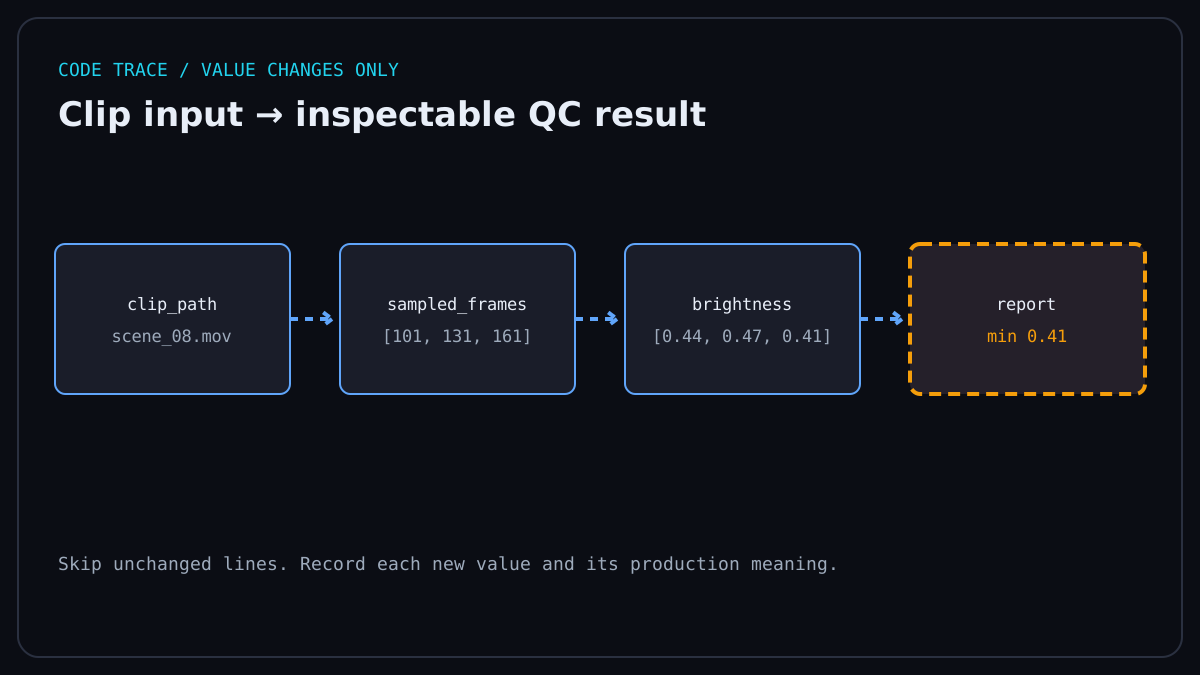
Treat a function like a post-production lane. A clip arrives, frames are sampled, measurements are collected, and a report leaves. Each variable is a labelled bin on that lane; each function is a station that changes or routes what is in the bin.
Runtime: Browser lab · standard Python · 10 min.
clip_path = "exports/scene_08.mov"       # input label
sampled_frames = [101, 131, 161]          # selected frame numbers
brightness = [0.44, 0.47, 0.41]           # measurements
report = {"clip": clip_path, "min": min(brightness)}
print(report)
The dictionary report preserves both the identity of the clip and the measurement needed for a later QC decision.
Sandbox lab
Open the browser practice bench and run the value-flow exercises one at a time. Before each run, write a prediction for the printed value; after it runs, compare that prediction with the output and explain the first transformation that changed it. The sandbox is a safe place to inspect standard Python, NumPy, and Pillow examples without needing a completed earlier course.
Values, names, and types
A value is the thing; a name lets you refer to it. Python decides the type from the value: 24 is an integer, 0.24 is a float, "ProRes" is a string, and True is a boolean. Types matter because a frame count can be added, while a codec name is text to compare or display.
Runtime: Browser lab · standard Python · 10 min.
frame_count = 240
fps = 24.0
codec = "ProRes 422"
has_alpha = False
duration_seconds = frame_count / fps
print(duration_seconds)  # 10.0
Use names that describe the production meaning. motion_delta makes a trace easier to audit than x.
Lists, dictionaries, and frames
A list keeps an ordered run of values. A dictionary stores named fields. A video can be represented first as a list of frame records before you ever touch pixels.
Runtime: Browser lab · standard Python · 10 min.
frames = [
    {"number": 0, "luma": 0.42},
    {"number": 1, "luma": 0.57},
    {"number": 2, "luma": 0.43},
]
first_luma = frames[0]["luma"]
print(first_luma)  # 0.42
frames[0] means the first record because indexing begins at zero. frames[0]["luma"] first selects that record, then the measurement under its named key.
Self-check
For frames[2]["number"], what prints? What would frames[-1]["luma"] select?
Branches and loops
An if branch selects a path. A for loop repeats a small operation for every frame. Indentation tells Python which lines belong to the branch or loop.
Runtime: Browser lab · standard Python · 10 min.
flagged_frames = []
for frame in frames:
    if frame["luma"] < 0.45:
        flagged_frames.append(frame["number"])

print(flagged_frames)  # [0, 2]
The loop never changes frames; it builds a separate list of frame numbers that cross the chosen threshold.
Functions and return values
A function names a reusable transformation. Parameters receive inputs; return hands a result back to the caller. Defining a function does not run it—calling it does.
Runtime: Browser lab · standard Python · 10 min.
def luma_range(values):
    return round(max(values) - min(values), 2)

range_score = luma_range([0.42, 0.57, 0.43])
print(range_score)  # 0.15
Read the call as a substitution: the list becomes values, the function computes one float, and that float receives the name range_score.
Imports, objects, and method calls
An import gives your program a tool from another module. An object bundles data and behaviours; a method is called through that object with a dot. You do not need to know an entire library to trace its contract.
Runtime: Browser lab · standard Python · 10 min.
from pathlib import Path

clip = Path("exports/scene_08.mov")
print(clip.suffix)       # .mov
print(clip.name)         # scene_08.mov
Path(...) creates a path object. clip.suffix reads a property; clip.name reads another. A call such as flagged_frames.append(4) asks the list object to add one value.
Trace a real media function
Here is a small, runnable CineQC-shaped function. Trace each line with the input list [0.42, 0.57, 0.43].
Runtime: Browser lab · standard Python · 15 min.
def classify_luma_jump(lumas, threshold=0.10):
    jumps = []
    for previous, current in zip(lumas, lumas[1:]):
        jumps.append(abs(current - previous))
    worst_jump = round(max(jumps), 2) if jumps else 0.0
    return {"worst_jump": worst_jump, "flagged": worst_jump >= threshold}

result = classify_luma_jump([0.42, 0.57, 0.43])
print(result)
lumas[1:] omits the first value, so zip pairs neighbours: (0.42, 0.57) then (0.57, 0.43). The jumps are approximately 0.15 and 0.14; the output boundary rounds the worst jump to two decimal places, so the returned dictionary is {"worst_jump": 0.15, "flagged": True}.
Self-check
Change the middle input to 0.48. Predict worst_jump and whether it is flagged before you run the code.
Failure clinic
Broken code is evidence. Make the failure small, read the exact value flow, then repair one assumption.
Runtime: Browser lab · standard Python · expected wrong value, then expected ValueError for the one-frame variant · 20 min.
def broken_luma_jump(lumas):
    jumps = []
    for previous, current in zip(lumas, lumas[1:]):
        jumps.append(current - previous)
    return max(jumps)

print(broken_luma_jump([0.80, 0.40]))
This returns -0.40, which hides the magnitude of a downward jump. The deliberate break is the missing abs(...). A second failure appears with [0.50]: max([]) raises an error. The working function handles both cases with abs and if jumps else 0.0.
CineQC transfer
Use the same trace when a real detector looks suspicious:
- Write down the input value and its unit: clip path, frame index, RGB array, or score.
- Follow every transformation, including list slicing and threshold comparisons.
- State the returned value and who consumes it: a report, a UI badge, or a human reviewer.
A model may be complex; the contracts around it are still values moving through functions.
Evidence gate
Submit a short screen recording or narrated note that proves you can read, not merely run, the function.
- Narrated trace: explain
classify_luma_jumpline by line for[0.42, 0.57, 0.43], including the two pairs, two jumps, and returned dictionary. - Changed-input prediction: before running it, predict the full return value for
[0.42, 0.48, 0.43]with the default threshold. - Deliberately broken version: run
broken_luma_jump([0.80, 0.40]), explain why its negative answer is wrong for a magnitude metric, then repair it withabsand explain the empty-list guard.
Your evidence passes when another person can reconstruct the value flow from your narration.
One-page summary
- Names label values; types tell you what operations make sense.
- Lists preserve order; dictionaries preserve named fields.
- Branches choose a path; loops repeat a transformation.
- Functions receive inputs and return outputs; methods belong to objects.
- Trace a media pipeline from input through every transformation to an inspectable result.
- When it fails, reduce the case, state the expected value, and locate the first wrong transformation.
Read only the selected function, loop, and branch sections while tracing media code; no external course is required. · 25 min
Narrated trace of a small unfamiliar media-processing function.
Check the statements you can demonstrate in the challenge. Selections route your learning; they are not proof of mastery.
Start the full milestone.
Submit an inspectable artifact for independent review. Only a verified diagnostic challenge or reviewed evidence can mark this milestone proven. Proof is local self-tracking, not tamper-resistant against edits to this browser storage.
- Narrate variables, collections, function calls, imports, objects, and control flow.
- State a prediction before the function runs.
- Trace clips, frames, codecs, prompts, and QC scores through one observed failure or repair.
Current state: not-started. Advance through learning, practice, and submitted evidence; proof requires a later passed review.
Your local study notes mount here when JavaScript is available.
Teaching modes mount here when JavaScript is available. The readable course remains available without them.