Image and video pipelines
Inspect and transform media without losing temporal context.
- Build image operations that load, resize, convert, annotate, and save with explicit contracts.
- Use FFmpeg and ffprobe for metadata, extraction, sampling, and contact sheets.
- Design temporal sampling and subprocess failures that produce reproducible evidence.
Choose a sampling strategy that preserves the evidence needed for a QC investigation.
This milestone turns a clip into inspectable evidence: metadata, timestamped frames, a contact sheet, and one deterministic JSON report. You will build the bounded Media Probe CLI, not a general media manager.
Required route: diagnostic/model (45 min), image I/O (70 min), FFmpeg timeline work (105 min), sandbox build (90 min), failure clinic (35 min), transfer and evidence (75 min). Total: 7 hours, including the selected FFmpeg reading.
Entry diagnostic
A two-second, 24 fps clip may contain 48 frames. If the report needs evidence from beginning, middle, and end, explain why “take the first three frames” is weak. Choose three timestamps and state what a scene cut could invalidate.
Self-check
For a two-second clip, what evidence is preserved by samples at 0.25, 1.00, and 1.75 seconds that adjacent first frames do not preserve?
Why this matters in CineQC
A detector result without the exact decoded input, timestamp, and command is difficult to reproduce. Containers, frame rates, variable timestamps, rotation metadata, and color conversions can change what the metric receives. The probe creates a small chain of custody from clip to visual evidence.
Visual model — decode, sample, inspect, report
One timeline compares uniform samples with samples placed around a scene boundary and brief defect.
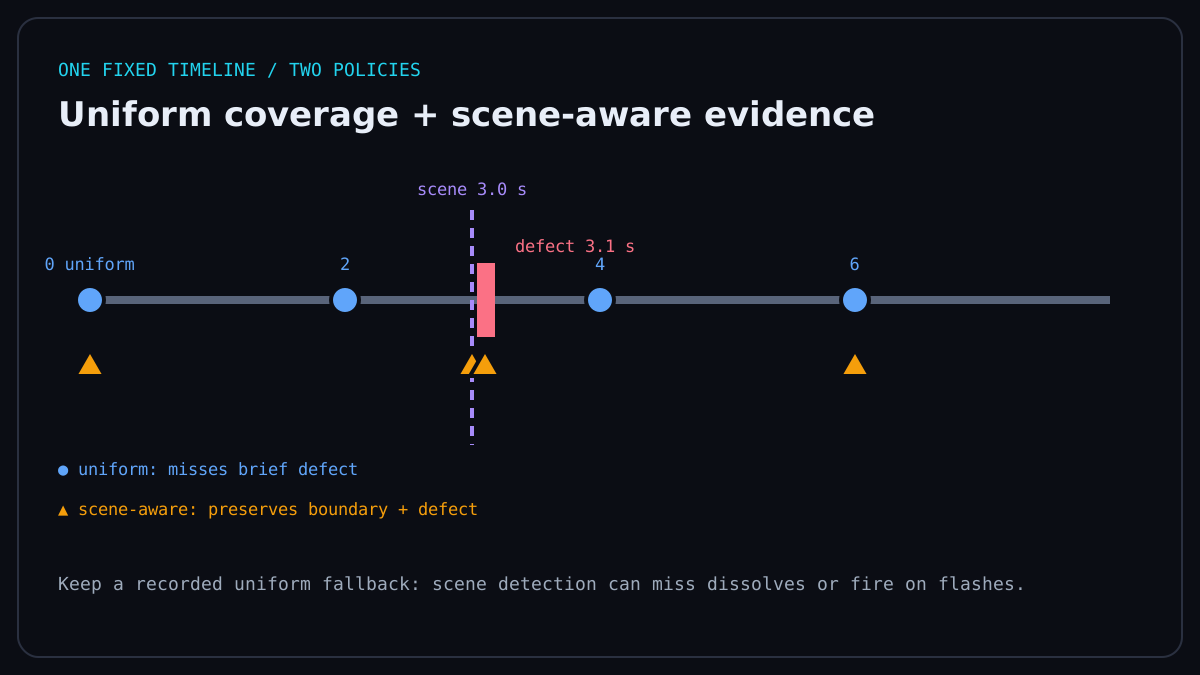
The pipeline is clip → ffprobe metadata → timestamp policy → decoded RGB frames → annotations/contact sheet → JSON manifest. Every stage has an explicit output, and a failed stage stops the report.
Pillow is a clear RGB route for saved images. With OpenCV, check that cv2.imread(path) did not return None; resize with cv2.resize, convert BGR to RGB with cv2.cvtColor, annotate a copy with cv2.putText, and verify the boolean returned by cv2.imwrite. OpenCV commonly decodes BGR, so convert before handing pixels to an RGB consumer. In both routes, resize by declared width and height, preserve aspect ratio intentionally, and write the interpolation choice into the code review.
Runtime: Local Python 3.12 · Pillow 12.x · 15 min.
from PIL import Image, ImageDraw

image = Image.new("RGB", (320, 180), (24, 38, 62))
thumb = image.resize((160, 90))
ImageDraw.Draw(thumb).text((8, 8), "t=1.00s", fill=(255, 194, 71))
thumb.save("sample-001.png")
print(thumb.mode, thumb.size)
Probe metadata before decoding
Use JSON output rather than parsing human-formatted console text.
Runtime: Local terminal · FFmpeg 8.x and ffprobe · tested two-second fixture · 10 min.
ffprobe -v error -show_entries format=duration:stream=index,codec_type,width,height,r_frame_rate -of json fixture.mp4Treat r_frame_rate as a rational string, not proof of presentation cadence. For exact temporal work, inspect timestamps rather than assuming frame number divided by nominal fps.
Inspect the video stream time_base beside each frame's best-effort presentation timestamp (PTS). A raw timestamp is a count of time-base ticks: with time_base 1/16384, PTS 8192 means 8192 × 1/16384 = 0.5 seconds. best_effort_timestamp_time is ffprobe's seconds conversion and is the safer field to place in a learner-facing report.
Runtime: Local terminal · FFmpeg 8.x and ffprobe · tested two-second fixture · 10 min.
ffprobe -v error -select_streams v:0 -show_entries stream=time_base:frame=best_effort_timestamp,best_effort_timestamp_time -of json fixture.mp4Extract timestamped evidence
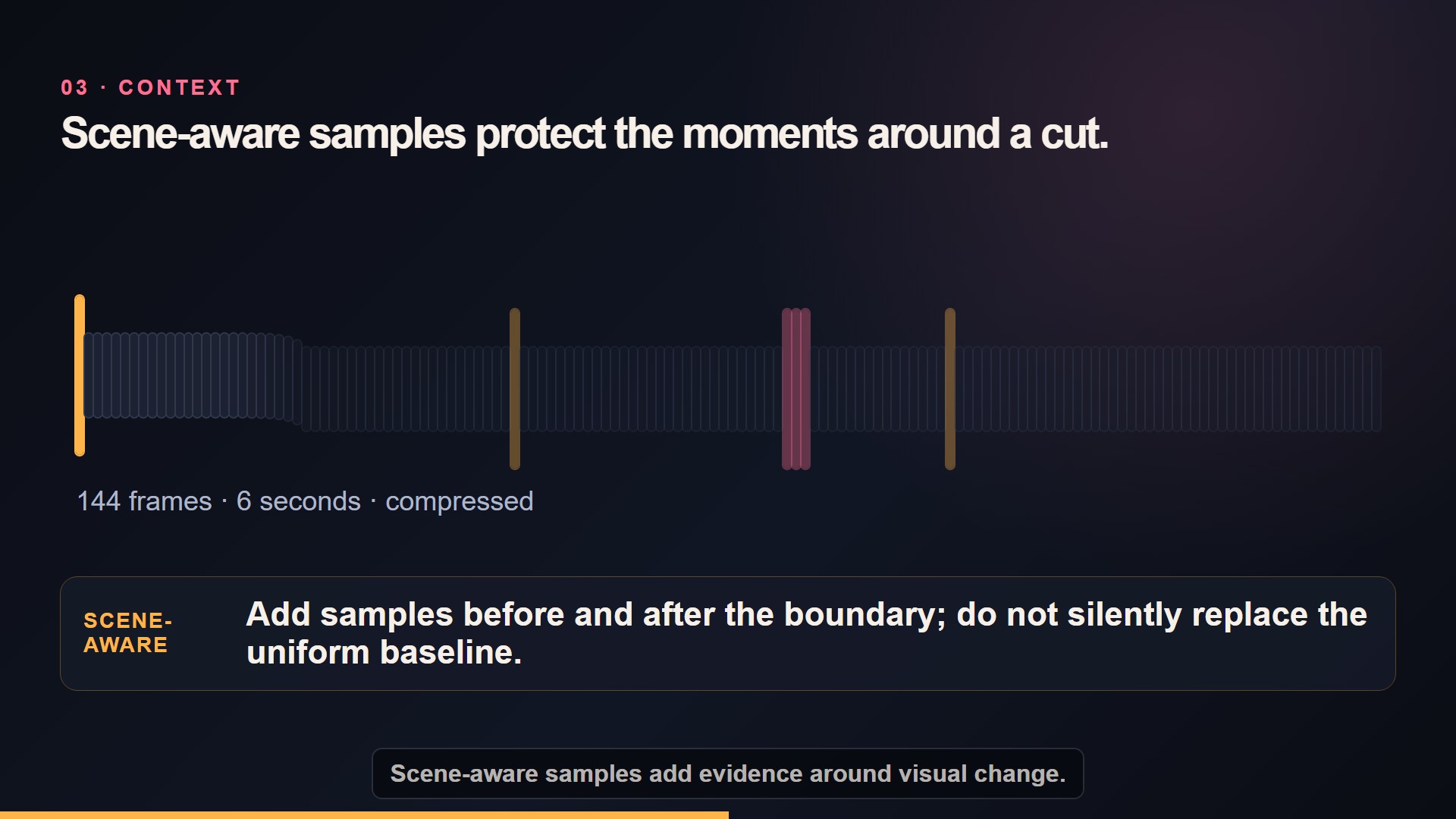
Annotated timeline showing all sampling stages at once. If the video cannot play, this image and the transcript preserve the complete teaching claim.
The following seeks to a chosen time, decodes one video frame, scales it to a review width, and names the output deterministically.
Runtime: Local terminal · FFmpeg 8.x · tested two-second fixture · 10 min.
ffmpeg -y -ss 1.00 -i fixture.mp4 -frames:v 1 -vf "scale=320:-2" sample-001.pngFor regular temporal sampling, fps=2 means two samples per second. A contact sheet tiles those samples in decode order.
Runtime: Local terminal · FFmpeg 8.x · tested two-second fixture · 15 min.
ffmpeg -y -i fixture.mp4 -vf "fps=2,scale=160:-2,tile=2x2" -frames:v 1 contact-sheet.pngScene-boundary sampling is evidence-driven, not magic. A select='gt(scene,0.30)' filter compares neighbouring content and can miss a dissolve or fire on a flash. Record the threshold and retain a uniform-sampling fallback.
Runtime: Local terminal · FFmpeg 8.x · tested two-second fixture · 15 min.
ffmpeg -y -i fixture.mp4 -vf "select='gt(scene,0.30)',scale=160:-2" -fps_mode vfr scene-%03d.pngSelf-check
Why is fps=2 a reproducible policy while “grab a few useful frames” is not? State one case where uniform sampling still misses evidence.
Make subprocess failure part of the contract
Use an argument list, capture output, and require a zero exit code. Never build an FFmpeg command from untrusted text with shell=True.
Runtime: Local Python 3.12 · FFmpeg 8.x · 20 min.
import subprocess

command = ["ffprobe", "-v", "error", "-show_entries", "format=duration", "-of", "json", "fixture.mp4"]
try:
    completed = subprocess.run(command, check=True, capture_output=True, text=True, timeout=15)
except subprocess.TimeoutExpired as error:
    raise RuntimeError(
        "ffprobe timed out after 15 seconds; verify the input is readable and run ffprobe -version"
    ) from error
except subprocess.CalledProcessError as error:
    raise RuntimeError(f"ffprobe failed ({error.returncode}): {error.stderr.strip()}") from error
print(completed.stdout)
Sort JSON keys and sample records, normalize paths to project-relative strings, and include tool version plus command arguments. Do not include machine-specific temporary paths in the proof artifact.
Sandbox lab
Work locally because the current browser runner does not include FFmpeg or OpenCV. Generate and verify the course’s deterministic two-second color-and-tone fixture with the command below, then build media_probe.py with these subcommands: metadata INPUT, sample INPUT --times ..., and contact-sheet INPUT. The script uses only FFmpeg lavfi red/blue color sources and a generated sine tone, so it contains no external footage or likeness; the hard red-to-blue transition makes scene-boundary output deterministic. The browser lab remains useful only for pure Python/NumPy/Pillow scratch work.
Runtime: Local terminal · Node.js 24, FFmpeg 8.x, and ffprobe · creates files only in the named temporary folder · 5 min.
node tests/fixtures/creative-ai/verify-phase2-media.mjs .phase2-media-practiceRequired output directory:
report.jsonwith schema version, input hash, media metadata, tool versions, commands, and ordered sample records;frames/containing timestamped PNG files;contact-sheet.pngcontaining the same ordered samples;- tests for a valid fixture, missing input, invalid timestamp, and failed child process.
Failure clinic
Investigate four deliberate failures:
- an input path with spaces passed as one shell string;
- OpenCV BGR displayed as RGB;
- integer frame-number sampling used on variable timestamps;
- FFmpeg exits nonzero but an empty
report.jsonis still called success.
Repair each at the contract boundary: argument lists, explicit color conversion, timestamp-based selection, and transactional output written only after every stage succeeds.
CineQC transfer
Run the probe on one sanitized CineQC test clip. Compare sampled timestamps with the frames used by one QC metric. If they differ, document which pipeline owns the sampling policy. The probe is evidence support; it does not replace CineQC or silently change production thresholds.
Self-check
What fields must a JSON report retain so another person can reproduce the same extraction without your machine? Name at least the input identity, versions, commands, and ordered timestamps.
Evidence gate
The Media Probe CLI is complete when the repository contains:
- a documented CLI with
metadata, timestampedsample, andcontact-sheetbehavior; - deterministic JSON with schema version, input hash, ffprobe fields, tool versions, commands, and ordered sample records;
- timestamp-labelled PNGs and a contact sheet produced from the public-safe two-second fixture;
- tests proving repeatability and clean failure for missing input, invalid timestamp, and child-process failure;
- a short README explaining Pillow RGB, OpenCV BGR, timeline assumptions, and known sampling limits.
Keep it bounded: one fixture, one report schema, three commands, and no GUI.
One-page summary
- Probe metadata before decoding frames.
- Name the Pillow RGB and OpenCV BGR boundary.
- Use timestamps when temporal evidence matters.
- Record uniform or scene-based sampling policy and its limits.
- Pass subprocess arguments as a list and fail on nonzero exit.
- Write deterministic, project-relative JSON only after success.
- The Media Probe CLI produces evidence, not a universal media platform.
Use only fps, select, scale, tile, and showinfo references while building the probe. · 25 min
Look up open, resize, convert, and save behavior used by the lab. · 15 min
Confirm explicit BGR/RGB conversion codes when an OpenCV route is required. · 15 min
Mini-capstone 1: Media Probe CLI with tests, JSON output, sampled frames, and a contact sheet.
Check the statements you can demonstrate in the challenge. Selections route your learning; they are not proof of mastery.
Start the full milestone.
Submit an inspectable artifact for independent review. Only a verified diagnostic challenge or reviewed evidence can mark this milestone proven. Proof is local self-tracking, not tamper-resistant against edits to this browser storage.
- Load, resize, convert, annotate, and save sampled frames with explicit image contracts.
- Produce timestamped samples and a contact sheet from a two-second fixture.
- Test invalid input and failed-process behavior without partial success claims.
Current state: not-started. Advance through learning, practice, and submitted evidence; proof requires a later passed review.
Your local study notes mount here when JavaScript is available.
Teaching modes mount here when JavaScript is available. The readable course remains available without them.